Trial Key
Free
Quick value check before any payment.
- No subscription
- No hidden fees
Payment is non-refundable.
CIMEA Fastpass
Start monitoring in under 2 minutes and avoid manual refresh loops while you focus on other things.
Start free to validate quickly. Upgrade only if you see the value.
See a real example from activation to payment detection. This is the fastest way to understand how CIMEA Fastpass works.
Free
Quick value check before any payment.
Payment is non-refundable.
$20
One successful payment-detection session.
Payment is non-refundable.
The extension never asks you to send card details to me.
It works in your browser flow to save your time from manual clicking.
Payment is handled by Stripe secure checkout.
Activate License.Start.Stop, the flow resets and you can start again from the same start page.https://mywallet.cimea-diplome.it/#/service/new.Payment title and First name(s) field.Start again.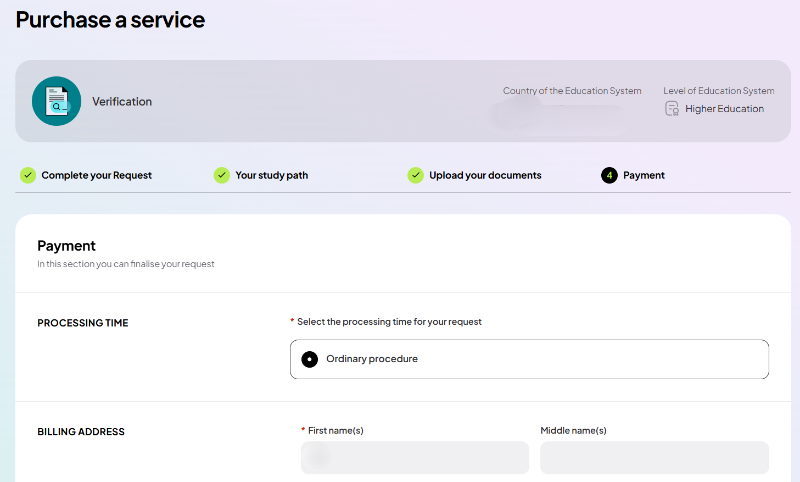
"Saved me 3+ hours of manual refreshing. I tested free first and upgraded after it worked."
"No hidden steps. I activated in under 2 minutes and Fastpass handled the waiting for me."
"I was skeptical at first, but the free trial proved the value before I paid."
See real people reviews and successful payment screenshots in our Facebook group.
Join Facebook Group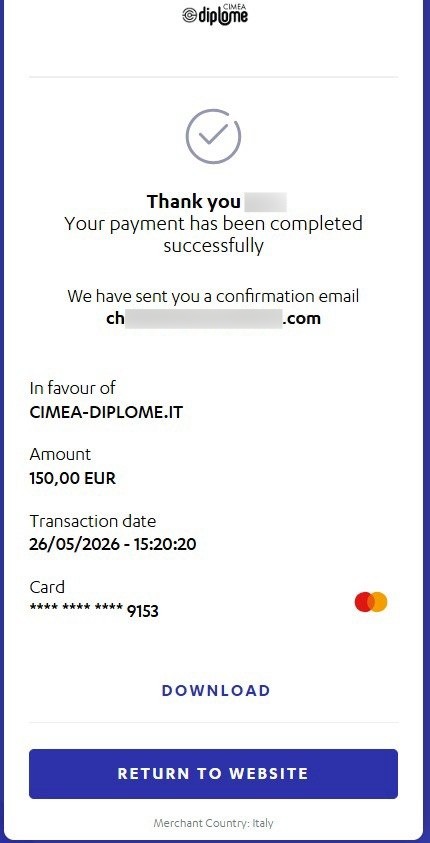
Example successful payment result shared by a user.
Yes. The extension stops refreshing, focuses the CIMEA tab, and plays a short beep to alert you.
Both Safe and Fast modes are generally safe, and many users use Fast mode successfully. If you prefer a more cautious approach, use Safe mode.
Use the free 1-day key first and decide yourself before paying.
No. Card checkout happens in Stripe. I do not collect card details in the extension.
No. All payments are non-refundable. Please use the free trial first to validate value before purchasing.
Each free trial key is valid for 24 hours from the moment you receive it.
A full key is consumed once a successful payment page is detected. You can purchase another full key anytime.
Start free now. Upgrade only if CIMEA Fastpass saves your time.
Support: support@cimea-fastpass.dev